Before I tell you the best way to start blogging for free, I want you to answer this question in the comment section below.
Question: What will you mainly blog about?
For example, travel, technology, work experiences, entertainment, food, photography or personal experiences?
This beginner’s guide to setting up a free blog features a step-by-step process, complete with images and live examples, to help you create your own free blog.
I will show you how to set up a free blog in under an hour, including picking the right platform, choosing a name and publishing your first post.
There are no hosting fees, and you can make basic customisations.
Platform 1: Blogger.com (AKA Blogspot.com)
Blogger is the best place to publish your passions your way.

If you want to share your professional knowledge, personal experiences or the latest news, this platform lets you create a beautiful, unique blog for free.
I will show you exactly how to create a blog on Blogger.com from scratch, as well as how I personally built a free blog in 10 minutes.
6 Tips: Aiso.blog’s step-by-step guide to creating a free blog on Blogger.com in 2026.
- Go to Blogger.com.
- Click ‘Create your blog’ and sign in with your existing Google account. If you don’t have one, create an account.
- Start and create a new blog for free.
- Enter a title for your blog (this will be the display name of your blog) and click ‘Next’.
- Type in a unique address for your blog (e.g. I created freeblogaiso.blogspot.com for this post) and choose an available name.
- Start blogging for free with Blogger.com.
Image reference for choosing a blog name:
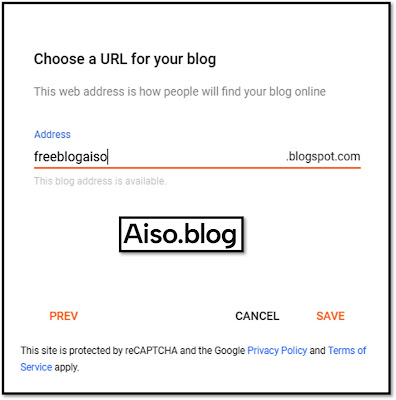
I’ve given the freeblogaiso domain address. This is as per the availability of the name.
Also published one blog post that teaches how to create a free blog on the Blogger platform.
Read here: https://freeblogaiso.blogspot.com/2026/01/create-blog-on-blogger.html
Blogger is a great free platform for beginners, thanks to its simplicity, the fact that it is owned by Google (making it easy to log in with a Google account), its seamless AdSense integration for monetisation and the fact that it is free, making it perfect for bloggers, hobbyists or those learning to blog.
You can also add custom themes and custom domains, which significantly boost professionalism, brand identity, SEO and reader trust compared to a blogspot.com URL.
This makes Blogger ideal for serious bloggers like Suresh.
I will add an example of a custom domain with Blogger for you later. Make sure you bookmark this page!
Now, let’s talk about the second-best free blogging platform.
Platform 2: Medium.com
Medium is the best place to read and write stories for free.
Anyone can share their insights, knowledge and life wisdom with the world on Medium.
How to get started with Medium writing?
- Go to Medium.com
- Create an account with Google, Facebook or email.
- Edit your profile details.
- Click on “Write” to start writing on Medium for free.
Very easy, right?
Example of Medium Blogging: Suresh Chaudhary
For your reference, here’s a link to my Medium profile: https://medium.com/@bedigisure.
I am actively writing blogs on Medium for free.

Why Medium is the best platform to start writing for free?
Medium is a great platform for free blogging.
It offers a large built-in audience, a simple interface and strong SEO potential thanks to its high domain authority.
This allows beginners to get readers immediately without needing technical skills or a big marketing budget. It also has monetisation options and fosters a community.
It removes technical concerns such as hosting and design, enabling you to focus purely on writing and reaching an extensive existing user base while ranking well on Google from day one.
Quick decision guide (what to choose first)
- Pick a platform: Blogger.com is the easiest free option to get started; it provides hosting, a subdomain, and built‑in themes.
- Decide your niche: pick a topic you can write about 10–20 times a month (for example: local food in Thailand, budget travel in Thailand, marketing guides, beginner coding).
- Set a simple blogging goal: publish 10 quality posts in the first month and share them on social media.
Step‑by‑step guide to launch a free blog in 2026 (quick path)
- Create an account on a free platform — sign up on Blogger.com (completely free and includes an
blogname.blogspot.comaddress and basic themes). - Choose a theme and site title — pick a clean, mobile‑friendly theme and a short, memorable blog name.
- Write your first posts — aim for 700–1,600 words for cornerstone posts; include images and headings for readability.
- Set essential pages — add About, Contact, and a Privacy/Disclaimer page.
- Promote — share posts on LinkedIn, Facebook, X (Twitter), and relevant Facebook groups; consider cross‑posting on Medium.com for more reach.
- Track performance — use built‑in stats or connect Google Analytics to monitor views and top posts.
Follow these steps to launch a blog quickly and for free.
Leave a comment below if you have any questions.
Free blogging platform comparison (quick at‑a‑glance)
| Platform | Free cost | Ease | Customization | Monetization |
|---|---|---|---|---|
| Blogger | Free to create blog | Free to create a blog | Basic templates | Can use AdSense, Affiliate links |
| Medium | Free to publish blogs | Easiest for beginners | Minimal site control | Medium Partner Program (eligibility rules) |
Sources: Blogger.com & Medium.com.
Final checklist for you (first 30 days)
- Create an account, select a theme and publish ten posts.
- Publish your ‘About’ and ‘Contact’ pages.
- Share your posts on social media, join communities, comment on other blogs and track your post analytics.
If you’re considering using WordPress for free blogging, here’s what I think.
WordPress is not recommended for FREE BLOGGING.
When it comes to blogging platforms, WordPress is the best, and Aiso Blog is powered by WP.
However, I would not advise bloggers and writers to use WordPress for free blogging.
So why is WordPress not the ideal choice for setting up a free blog?
Here are the top reasons:
- I tried creating a free blog with the domain Freeaiso.wordpress.com, but they are constantly encouraging me to upgrade.
- Difficult to find editing options.
- It won’t let me launch the free blog. I don’t know why. (Image attached.)
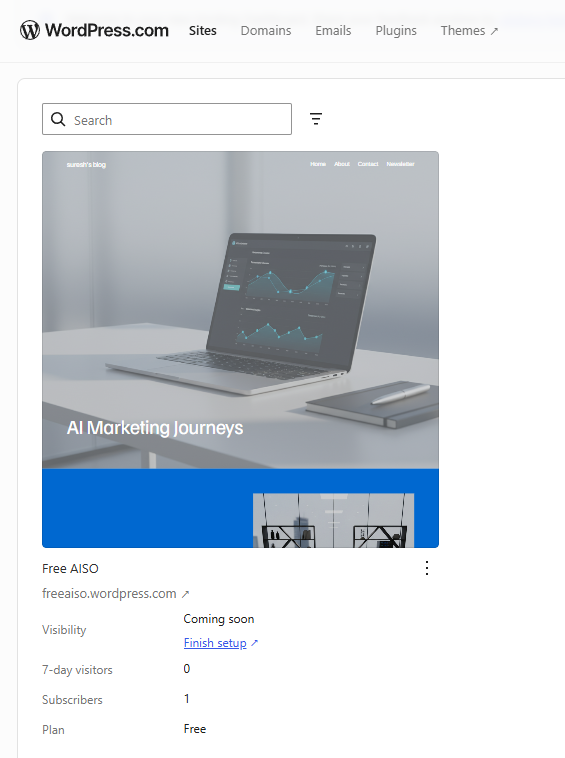
Overall, starting a free blog with WordPress.com was not a great experience for me. It’s not the easiest free option, so avoid it if you’re serious about blogging for free.
I hope you found this post about free blogging helpful. If you found it useful, please consider buying me a coffee!
You can also read my other posts on AI, SEO and blogging by following the links.
- Is Blogging Dead?
- Why I Chose .Blog Domain
- How to Index Your Blog Website
- Learn about Google AI Overviews
About Suresh

Leave a Reply