Are you facing website indexing issues in 2026?
Check out this guide for step-by-step instructions on how to index your website or blog.
The way Google collects and organises website content is complicated. Many different steps influence site indexing.
To get Google to index your website quickly, you need to make sure there are no problems that are stopping the search engine from indexing in the first place.
The best advice for indexing my website and improving Google presence for aiso.blog is to start with Google Search Console.
I created a free account and verified my site on GSC.
Here are the four simple steps I followed:
- Visited – https://search.google.com/search-console/about
- Added a new property – Aiso.blog
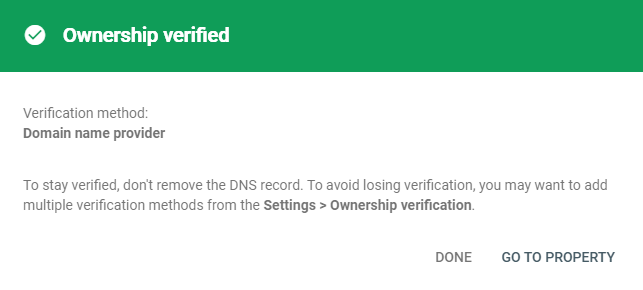
- Verified domain ownership via (TXT) DNS record.
- Google is processing data, and asked me to check again in a day or so.
Image of the domain verification screen for aiso.blog:
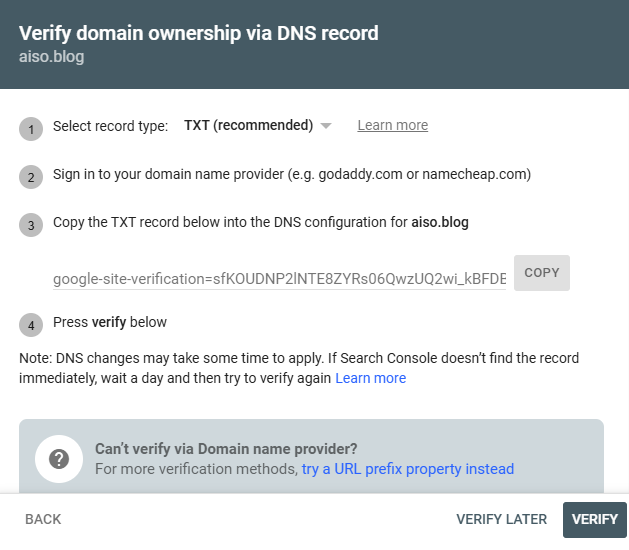
Image of the domain ownership verification:
Sitemap submitted successfully
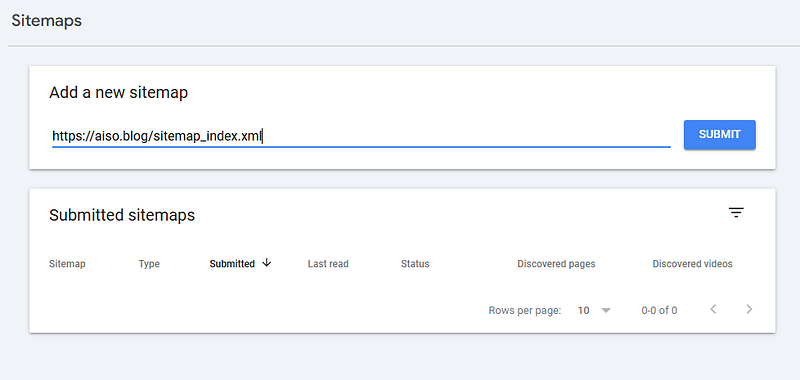
How to add a sitemap: Go to the Sitemaps option under the Indexing tab and add a new sitemap.
Aiso Blog Sitemap link: https://aiso.blog/sitemap_index.xml
Image of the sitemap submission screen:
Google periodically processes this website’s data to look for changes.
Please note that you will be notified in GSC if anything goes wrong with your website in future.
How do I index my website?
To get your website indexed, submit your site’s sitemap (sitemap.xml) using Google Search Console (GSC), then use the URL Inspection tool to request indexing for specific new pages.
Ensure your site has quality content and proper internal links, and remove any noindex tags that might be blocking crawlers to achieve a faster, broader index.
6 Key steps to get indexed:
- Verify in Google Search Console (GSC). Add your website property to Google Search Console — the essential tool for website owners.
- Create and submit a sitemap. Generate an XML sitemap (a roadmap of your site) and submit it to GSC. This will help Google to find all your pages at once.
- Use the URL Inspection tool: For individual pages, especially new ones, paste the URL into the ‘URL Inspection’ tool in GSC and click ‘Request Indexing’ to queue it for crawling.
- Build quality content. Create valuable, user-focused content that Google wants to rank. For example, I create helpful content related to AI, search marketing and optimisation on the Aiso blog. This includes free tools, tips, and AI SEO blueprint guides.
- Improve internal linking: Link relevant pages together within your site to help Google discover content. You can read my articles to learn how I carry out internal link building for this site.
- Check robots.txt and meta tags. Make sure that your robots.txt file isn’t blocking important pages and that you haven’t mistakenly added noindex tags to content that you want to be indexed.
2 More quick checks:
- Check index status: Search Google for ‘site:aiso.blog‘ to see what’s already indexed.
- Monitor GSC: Use the Index Coverage report in GSC to identify and resolve indexing issues.
Following these steps will help search engines to discover, crawl and add your website’s content to Google’s search results efficiently.
Index Your Website & Get on Google
Do everything you can to tell Google about new content and that you want your website to be indexed.
Remember that the quality of your content and the lack of internal links could cause problems during the indexing process.
Popular tip: make your website more popular by building links to your website and encouraging people to share your content on social media and other websites.
If you have a good plan and a list of things to do, you can get Google to list the most important parts of your website and improve your SEO performance so that your website appears higher up in search results.
About Suresh
