AI Overviews (Artificial Intelligence Overviews) is a widely discussed and highly relevant topic, particularly within the digital marketing and SEO communities.
It signifies a substantial change in the presentation and consumption of AI-powered search results.
Google is recreating search with AI-generated answers.
These new AI Overviews appear at the top of the SERP page, above ads, snippets, and organic results.
They summarise information from multiple sources, providing users with instant answers without the need to click.
For SEOs, this is a game-changer. Welcome to the AI SEO era.
You’re not just optimising for rankings anymore. You also need to ensure that you are cited, quoted and trusted by Google’s AI.
Now the fight is for AI brand visibility.
In this post, we will find out what AI overviews are. How do they work?
We will also find out how to optimise for them at the Aiso Blog.
What is Google’s AI Overview?
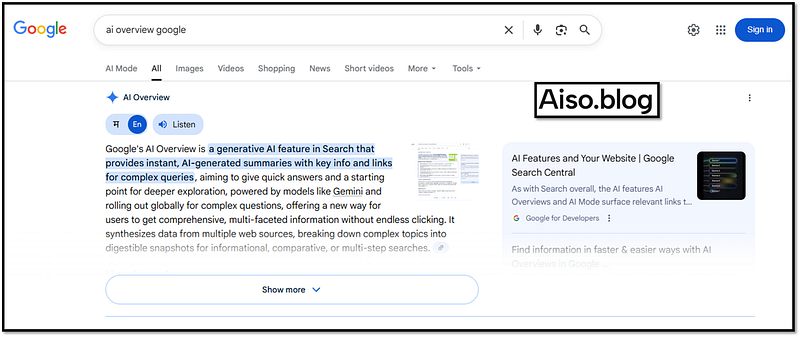
Google’s AI Overviews are generative AI features in Search that provide instant summaries with key information and links for complex queries.
They aim to provide quick answers and a starting point for further exploration.
Powered by models such as Gemini, they are rolling out globally for complex questions and offer users a new way to access comprehensive, multifaceted information without having to click through endless pages.
It synthesises data from multiple web sources, breaking down complex topics into digestible snapshots for informational, comparative or multi-step searches.
This is how Google’s AI Overview works:
Analyses search intent: Understands complex questions and user needs beyond keywords.
Gathers info: Pulls information from high-quality web sources, sometimes across subtopics.
Synthesises answers: It creates concise summaries, lists or step-by-step guides.
Provides reference sources: Links directly to supporting websites for further information.
Multiple modes: It can be triggered by text, voice or image searches and has an experimental ‘AI Mode’ for follow-ups.
How to Optimize for Google’s AI Overview?
To optimise for Google AI Overviews, create clear, concise and authoritative content with strong E-E-A-T signals.
Use structured formats such as lists, FAQs and tables, as well as schema markup, to help AI understand your content.
Focus on long-tail, question-based queries and provide direct answers.
Cite sources and ensure excellent page speed and a positive mobile experience for the best results.
Focus on Content & Structure
Direct Answers: Provide clear, concise answers early in your content, especially for questions.
Structured formatting: Use headings (H2, H3, H4), bullet points, numbered lists and FAQs to break up the text.
Natural Writing: Write conversationally, using long-tail keywords and question-based phrases that match user intent.
Focus on E-E-A-T:
E-E-A-T: Demonstrate experience, expertise, authoritativeness and trustworthiness by providing in-depth, accurate information.
Topical authority: Build content clusters around related topics to demonstrate your expertise.
Multimedia: Incorporate relevant images, videos and infographics.
Technical SEO Implementation:
Implement JSON-LD schema (FAQ, article and how-to) to help Google understand the context of your content.
Page experience: Ensure fast page load times and mobile-friendliness.
Structured data: Match structured data with visible content accurately.
Content Strategy: analyse AI overviews.
Study existing AI overviews for your target queries to understand the formats and information that Google prioritises.
Cite relevant sources: Link to credible, authoritative sources to back up your claims.
For instance, here is a list of the sources that were used for this post.
- https://search.google/ways-to-search/ai-overviews
- https://developers.google.com/search/docs/appearance/ai-features
- https://support.google.com/websearch/answer/14901683
Update regularly: Keep content fresh and relevant to avoid outdated information.
Internal linking: Connect related pieces of content to keep users engaged.
You can use tools such as Promptwatch to analyse and optimise your content for AI-powered searches.
When and where can you find AI overviews?
AI Overviews appear at the top of Google Search results for queries where generative AI can be especially helpful.
They provide a synthesised snapshot with key information and links, and are often triggered by complex or informational searches.
They can be triggered using text, images or Circle to Search, which was launched more widely in mid-2024 and is now available in many countries and languages.
AI Overviews typically appear before organic results, providing quick answers to questions such as definitions, multi-step tasks or comparisons, and are designed to save users from having to click on multiple links.
Where they appear (position):
Top of search results: Usually at ‘position zero’, above organic listings and sometimes even ads.
Desktop & mobile: They dominate screen space on desktop and appear in card-like boxes on mobile.
When they appear (query types):
Complex/informational queries: When quickly understanding information from multiple sources is beneficial (e.g. ‘how to learn ai‘).

AI Overviews are most likely to appear for searches that begin with “how,” “what,” or “why”.
Image searches: When searching with an image or using ‘Circle to Search’.
Helpful for exploration: Queries that require reasoning, comparison or exploration of new concepts.
High-trigger industries: Healthcare, Artificial Intelligence, science and ‘people and society’ queries often trigger them.
Less common for e-commerce: Shopping and real estate queries are less likely to trigger them.
About Suresh

Valuable information. Lucky me I found your site by accident, and I’m shocked why this accident didn’t happened earlier! I bookmarked it.